
Event Management
Plan and coordinate BATbern conferences
Implemented
Last Updated: 2026-06-13
Overview
Events are BATbern conferences - the central entity that organizes all other platform activities. Each event represents a single conference occurrence (e.g., “BATbern 2025”) with its own timeline, speakers, sessions, and partners.
Event Types
Implemented
BATbern supports 3 distinct event formats:
🌞 Full-Day Conference
FULL_DAY
Duration: 8+ hours (e.g., 9:00 - 18:00)
Typical Structure:
- Morning keynote
- Multiple parallel tracks
- Lunch break
- Afternoon workshops
- Evening networking reception
Sessions: 8-12 presentations Speakers: 10-15 speakers Capacity: 200-500 attendees
Best For: Annual flagship conferences
🌤️ Afternoon Workshop
AFTERNOON
Duration: 3-4 hours (e.g., 14:00 - 18:00)
Typical Structure:
- Introduction
- 2-3 focused presentations
- Q&A and discussion
- Networking coffee
Sessions: 2-4 presentations Speakers: 3-5 speakers Capacity: 50-100 attendees
Best For: Specialized topics, workshops, training
🌙 Evening Lecture
EVENING
Duration: 2-3 hours (e.g., 18:00 - 21:00)
Typical Structure:
- Welcome reception
- Keynote presentation
- Panel discussion or Q&A
- Networking drinks
Sessions: 1-2 presentations Speakers: 1-3 speakers Capacity: 30-80 attendees
Best For: Guest speakers, networking events, launch events
Creating an Event
Navigate to Events
Click 📅 Events in the left sidebar.
Click “Create New Event”
Click the + Create New Event button (top-right).
Fill Event Details
Complete the event creation form:
Basic Information:
- Event Name* - Unique name (e.g., “BATbern 2025”)
- Event Code* - Auto-generated public identifier (e.g., “BAT-2025-001”) - used in URLs and QR codes
- Event Type* - Select: Full-Day, Afternoon, or Evening
- Description - Event overview (optional, supports Markdown)
- Max Attendees - Registration capacity limit (optional)
- Waitlist Enabled - Allow waitlist when capacity reached
Timeline:
- Event Date* - Main conference date
- Event Time* - Start and end times
- Registration Opens* - When attendees can register
- Registration Closes* - Registration deadline
Location:
- Venue Name - Location name (e.g., “Kursaal Bern”)
- Address - Full street address
- City* - Bern or other Swiss city
- Canton - Swiss canton (BE, ZH, etc.)
- Postal Code - Swiss postal code
Publishing Settings:
- Auto-publish Speakers - Automatically publish speaker profiles 30 days before event (default: enabled)
- Auto-publish Agenda - Automatically publish full agenda 14 days before event (default: enabled)
- Auto-transition to Live - Automatically transition to EVENT_LIVE state on event day (default: enabled)
- Auto-transition to Completed - Automatically transition to EVENT_COMPLETED state after event ends (default: enabled)
Save
Click Save to create the event.
Event is created with initial state: CREATED
Success message: “Event ‘BATbern 2025’ created successfully. Ready to begin workflow.”
Event Workflow States
Implemented
Events progress through a 9-state workflow that tracks the high-level event lifecycle.
State Machine Overview
State Descriptions
| State | Description | How Reached |
|---|---|---|
| CREATED | Event record created | Event creation form submitted |
| TOPIC_SELECTION | Topics chosen using heat map | Minimum 1 topic selected |
| SPEAKER_IDENTIFICATION | Building speaker pool, outreach ongoing | Minimum speaker candidates identified |
| SLOT_ASSIGNMENT | Assigning speakers to time slots | All confirmed speakers assigned |
| AGENDA_PUBLISHED | Public agenda live, accepting registrations | Publish agenda action |
| AGENDA_FINALIZED | Agenda locked for printing | Manual finalization (2 weeks before) |
| EVENT_LIVE | Event currently happening | Event day arrives |
| EVENT_COMPLETED | Event finished, post-processing | Manual transition after event |
| ARCHIVED | Event archived for historical reference | Manual archival action |
Note: Speakers progress through their own independent workflow (identified → contacted → ready → accepted → content_submitted → quality_reviewed → confirmed) in parallel with the event workflow.
See Workflow System for complete workflow documentation.
Event Timeline Management
Date & Time Fields
Event Date & Time:
- Primary conference date and time
- Used for countdown timers
- Displayed on event landing pages — the resolved start and end times are shown on the public event page so that prospective attendees see the full duration at a glance
Registration Window:
- Registration Opens: When public can register
- Registration Closes: Cutoff for new registrations
- Automatic validation:
Opensmust be beforeCloses
Recommended Lead Time:
- Full-Day: 3-4 months advance registration
- Afternoon: 4-6 weeks advance registration
- Evening: 2-4 weeks advance registration
Timeline Validation
The system validates timeline logic:
Registration Opens: 2025-01-15
Registration Closes: 2025-03-10
Event Date: 2025-03-15

✅ Valid timeline
Registration Opens: 2025-03-01
Registration Closes: 2025-02-28  ❌ Error
Event Date: 2025-03-15

Error: Registration closes before it opens
Registration Opens: 2025-01-15
Registration Closes: 2025-03-20  ❌ Error
Event Date: 2025-03-15

Error: Registration closes after event date
Event Sessions
Implemented
Events contain sessions - individual presentations or activities.
Session Structure
Each session has:
- Topic - Subject matter (selected in Phase A)
- Title - Specific presentation title
- Speaker(s) - One or more presenters
- Time Slot - Scheduled time (assigned in Phase D)
- Description - Session overview (≤1000 chars)
- Track - Parallel track (for multi-track events)
Session Types
Main Presentations:
- 45-60 minute talks
- Single speaker or panel
Workshops:
- 90-120 minute interactive sessions
- Multiple facilitators
Keynotes:
- 60-90 minute flagship presentations
- Prominent speakers
Networking:
- Break periods
- Coffee, lunch, reception
Managing Sessions
Sessions are managed throughout the workflow:
- Phase A (Setup): Topics selected (becomes session topics), speakers brainstormed
- Phase B (Outreach): Speakers contacted and accept invitations
- Phase B (Content): Speakers submit presentation titles and content
- Phase C (Quality): Content reviewed and approved
- Phase D (Assignment): Sessions assigned to time slots, agenda published
See Phase D: Assignment for session slot assignment details.
Event Speakers
Speaker Assignment
Speakers are linked to events through sessions:
Event: BATbern 2025
├─ Session 1: Sustainable Building Materials
│  └─ Speaker: Hans Müller (Müller Architekten AG)
├─ Session 2: Digital Transformation
│  └─ Speaker: Anna Schmidt (Schmidt & Partner)
└─ Session 3: Urban Planning
   └─ Speakers: Peter Meier, Lisa Weber (Panel)
Speaker Status Tracking
Implemented
Each speaker progresses through their own workflow independently:
| Status | Description | Next Action |
|---|---|---|
| identified | Potential speaker brainstormed | Contact speaker |
| contacted | Initial outreach recorded | Await response |
| ready | Speaker ready to accept/decline | Get acceptance |
| accepted | Speaker committed to presenting | Collect content |
| declined | Speaker not available | Contact backup |
| content_submitted | Presentation details submitted | Review quality |
| quality_reviewed | Content approved by organizer | Assign time slot |
| confirmed | Quality reviewed AND slot assigned | Ready for publication |
| overflow | Accepted but no slot available | Backup speaker |
| withdrew | Speaker dropped out after accepting | Find replacement |
Note: Speakers reach confirmed automatically when both quality_reviewed AND session.startTime exist (can happen in any order).
See Phase B: Outreach for speaker tracking details.
Event Partners
Implemented
Events can have partners - organizations providing sponsorship or collaboration.
Partner Tiers
Partners are assigned tiers based on contribution level:
- 💎 Diamond - Highest tier, prominent placement
- 🥈 Platinum - Premium tier
- 🥇 Gold - Standard sponsorship
- 🥈 Silver - Supporting sponsorship
- 🥉 Bronze - Basic sponsorship
Partner Benefits
Partners receive:
- Logo placement on event materials
- Booth/table at event venue
- Attendee list access (GDPR compliant)
- Speaking opportunities (higher tiers)
- Meeting coordination with attendees
See Partner Management for details.
Viewing Event Details
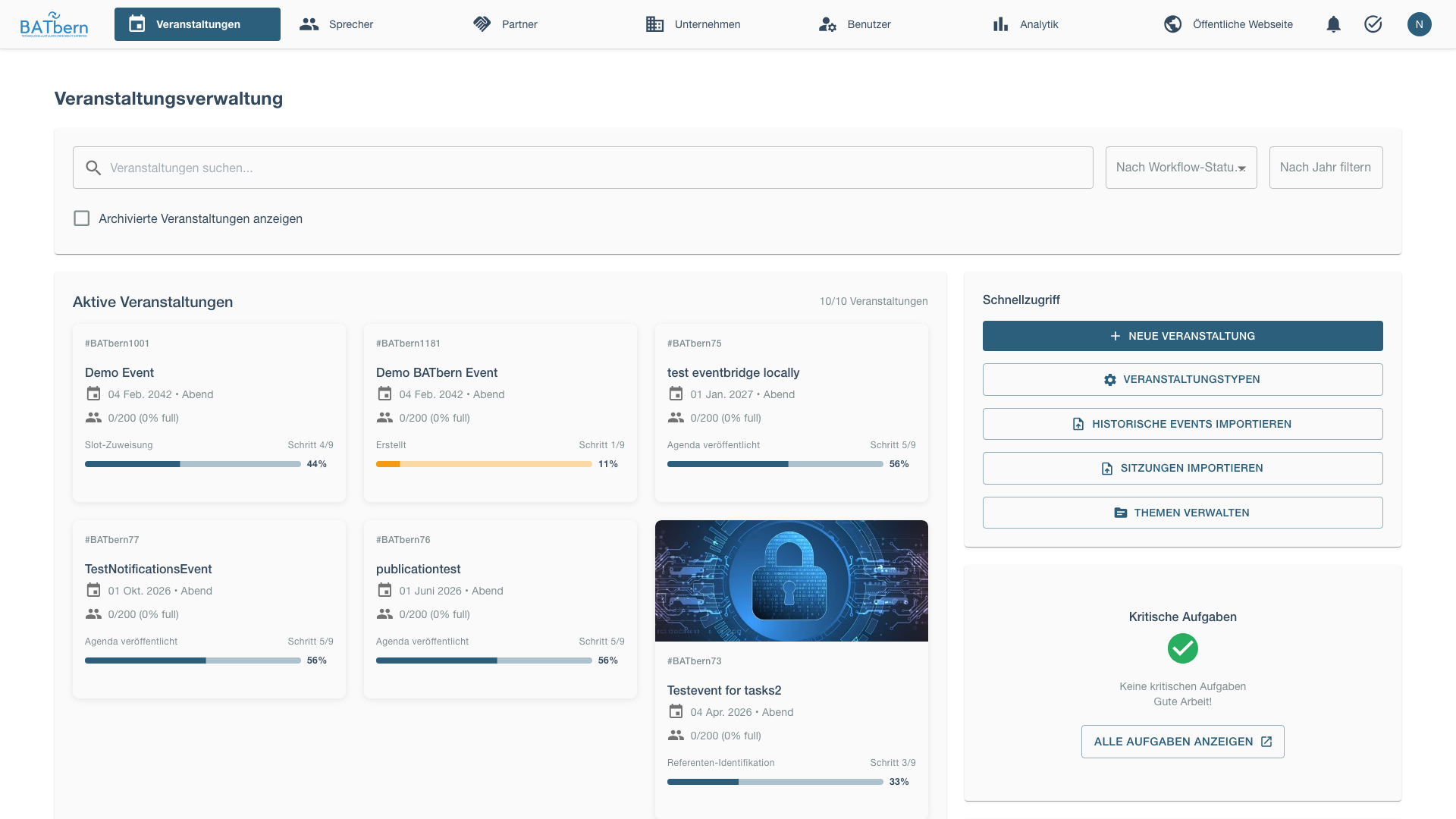
Event detail view shows comprehensive information:
Tabs
General:
- Basic information (name, type, description)
- Timeline (dates, registration window)
- Location and venue
Sessions Implemented:
- List of all sessions
- Session schedule (timeline view)
- Speaker assignments
Speakers Implemented:
- List of speakers (per-event pool entries — Epic 11 / ADR-009)
- 8-state speaker workflow status (identified → … → confirmed)
- Contact history
Partners Implemented:
- List of event partners
- Partner tier badges
- Meeting coordination
Attendees Planned:
- Registration list
- Attendance tracking
- Check-in status
Analytics Planned:
- Registration funnel
- Speaker engagement
- Attendee demographics
Editing an Event
Find the Event
Search or browse the event list.
Click Edit
Click 📝 Edit icon in event row.
Modify Fields
Update event information. Note:
- Event type can be changed (affects session structure)
- Timeline dates can be adjusted (with validation)
- Workflow state cannot be manually changed (use workflow)
Save Changes
Click Save Changes to persist updates.
Deleting an Event
Click Delete
Click 🗑️ Delete icon in event row.
Confirm Deletion
Delete Event?
────────────────────────────────────
Delete "BATbern 2025"?

This will permanently delete:
- 8 sessions
- 12 speaker assignments
- 237 attendee registrations
- Event timeline and data

This action CANNOT be undone.

[Cancel]           [Delete]
Type event name to confirm: BATbern 2025
Click Delete to confirm.
Resource Expansion
Implemented
Optimize API requests by expanding related entities:
GET /api/events/123?expand=speakers,partners,sessions

{
  "id": "123",
  "name": "BATbern 2025",
  "eventType": "FULL_DAY",
  "eventDate": "2025-03-15",
  "speakers": [
    { "id": "456", "name": "Hans Müller", "status": "CONFIRMED" },
    { "id": "789", "name": "Anna Schmidt", "status": "CONFIRMED" }
  ],
  "sessions": [
    { "id": "101", "topic": "Sustainable Building", "speaker": "456" }
  ],
  "partners": [
    { "id": "202", "name": "Partner AG", "tier": "GOLD" }
  ]
}
Returns event with all related data in a single request.
Event Dashboard Widget
Implemented
Active events appear as cards on the organizer dashboard:
┌────────────────────────────────────────┐
│ BATbern 2025                           │
│ [FULL_DAY] [SPEAKERS_IDENTIFIED]       │
├────────────────────────────────────────┤
│ 📅 March 15, 2025                      │
│ ⏰ 45 days until event                 │
│ 🎤 8 of 12 speakers confirmed          │
│ 🎫 237 registrations (of 500)          │
├────────────────────────────────────────┤
│ [Continue Workflow] [View Details]     │
└────────────────────────────────────────┘
Click Continue Workflow to jump to the current workflow step.
Common Issues
“Registration opens after event date”
Problem: Invalid timeline configuration.
Solution:
- Ensure Registration Opens < Registration Closes < Event Date
- Adjust dates to maintain logical sequence
“Cannot change event type after sessions created”
Problem: Changing event type affects session structure.
Solution:
- Delete existing sessions first (if needed)
- Or create a new event with the correct type
- Contact support if you need to migrate sessions
“Event stuck in CREATED state”
Problem: Event not progressing through workflow.
Solution:
- Navigate to the event in Phase A workflow
- Select topics to advance to TOPIC_SELECTION state
- Add speaker candidates to reach SPEAKER_IDENTIFICATION
- See Workflow System
Related Topics
- Workflow System → - 9-state event workflow, per-speaker workflow, task system
- Phase A: Setup → - Event creation and initial configuration
- Speaker Management → - Manage event speakers
- Partner Management → - Coordinate event partners
- Topic Heat Map → - Select event topics
API Reference
Endpoints
POST   /api/events                 Create event
GET    /api/events                 List events (paginated)
GET    /api/events/{id}            Get event by ID
PUT    /api/events/{id}            Update event
DELETE /api/events/{id}            Delete event
GET    /api/events/{id}/sessions   Get event sessions
GET    /api/events/{id}/speakers   Get event speakers
GET    /api/events/{id}/partners   Get event partners
POST   /api/events/{id}/workflow   Advance workflow state
See API Documentation for complete specifications.